Best local-AI mini PC with 128GB for running LLMs at home: the Strix Halo upgrade path explained
We may earn a commission if you buy through these links — at no cost to you.
Short answer: for running serious local LLMs at home in a small, quiet, low-power box, the value pick is an AMD Ryzen AI Max+ 395 (“Strix Halo”) mini PC with 128GB of soldered unified memory, and the one upgrade that matters after that is the SSD. Because the RAM is soldered and cannot be changed later, you buy 128GB up front if that is the class of model you want: it is the number that lets a 70B-parameter model load entirely in memory. Everything else is battery-of-choice; the two levers that actually scale are memory (fixed at purchase) and storage (upgradeable). This guide is written for the person who wants a private, offline local-AI box and wants to know exactly what to click, how the SSD math works, and where the Strix Halo genuinely wins or loses against the alternatives.
How we picked these
Local AI is a memory decision more than a compute decision
When people first spec a local-AI machine they reach for GPU “TOPS” numbers. The honest first principle is different: the model you can run at home is decided by how much unified memory you have and how fast that memory is, far more than by the tensor-top. A dense 70B-parameter model at a usable 4-bit quantisation needs roughly 40GB of weights that must be resident in memory on every token; a 32B model needs about 19–20GB. Fitting the model is a memory question. Generating it fast is a memory-bandwidth question — every output token has to stream those weights through, so bandwidth, not compute, sets the tokens-per-second.
That is the entire reason the “128GB mini PC” category exists: it is the cheapest small box that can hold a 70B model and a wide library of 8B–32B models, fully private and offline. The catch everyone discovers late is the one this guide exists to make plain up front.
The first trap: 128GB is not 128GB of model capacity
Every vendor quotes the raw RAM. Every one of them reserves a chunk for the operating system and the GPU driver, and they do it differently:
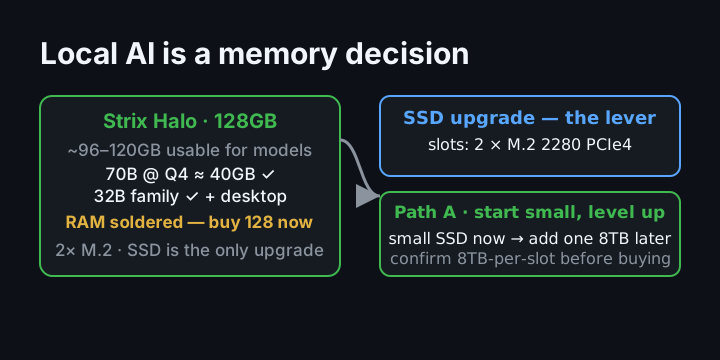
- Windows on Strix Halo: AMD’s driver lets you dedicate at most 96GB of a 128GB system to the GPU by default (configurable in BIOS/Adrenalin). The other roughly 32GB stays as system memory — which matters if you run the model next to a desktop you are actually using.
- Linux on Strix Halo: no such cap enforced, which is why tinkerers run Linux when they want the full pool for a model.
- macOS: Metal wires roughly 75% of RAM to the GPU by default — about 96GB on a 128GB Mac — and a
sysctl(iogpu.wired_limit_mb) can push that to ~120GB, leaving ~8GB for the OS. - NVIDIA DGX Spark: its own stack keeps a reserve; plan on roughly 120GB usable of 128GB.
The practical planning number is ~96GB usable out of the box, ~120GB tuned. Write your model list against that, not against 128. The good news: 96GB comfortably holds a 70B Q4 plus a loaded desktop, and the tuned number holds the big sparse MoE models.
Why SSDs are the only real upgrade lever on this machine
Strix Halo mini PCs ship with on-board LPDDR5X-8000 that is soldered and permanent. You buy the RAM tier once; there is no SO-DIMM slot and no later upgrade. That is precisely why you buy 128GB now if 128GB is the goal — the memory is the one thing you cannot add later (for cheap, at least; the SSD is the only true expansion).
The good news is that these boards make the SSD genuinely upgradeable, and the SSD is the real “max it out” lever. The GMKtec EVO-X2-class boards carry two M.2 2280 PCIe 4.0 x4 slots. How much each slot actually accepts is where you have to be careful — see the honesty block below — but the design intent is a two-drive bay you can grow.
This is the direct answer to the question “can I buy it with 8TB in one slot and just add one more 8TB?”: most of these boxes do not ship pre-loaded with an 8TB drive (typical factory configs are 1TB or 2TB, some 4TB), so you cannot buy the “8TB factory” version. What you can do is buy a low-SSD config and drop in an 8TB M.2 yourself — a standard Gen4 2280 drive fits physically. Whether the slot’s firmware will address a full 8TB is the one thing to confirm before spending (see the honesty note), because 8TB-per-slot is the marketing number while the manual says 4TB.
The Strix Halo pick: what to click
The four serious 128GB Strix Halo boxes are the GMKtec EVO-X2, Minisforum MS-S1 Max, Framework Desktop, and Beelink GTR9 Pro — plus AMD’s own Ryzen AI Halo Developer System. They all run the identical Ryzen AI Max+ 395 silicon (16 Zen5 cores / 32 threads, Radeon 8060S 40CU, XDNA2 NPU), so benchmarks land in the same band and the decision is really about price, stock, I/O, and serviceability — not performance deltas. Right now stock is the wildcard: this market is shortage-era, cheapest boxes often show “unavailable,” and marketplace scalpers sell above vendor list. Treat any price as an offer to join a queue and confirm the seller has units in hand.
Best overall: the GMKtec EVO X2
This is the pick for a single-desk, private local-AI setup: the 128GB GMKtec EVO-X2 — 128GB LPDDR5X-8000, two M.2 2280 slots, 2.5GbE + Wi-Fi 7 + dual USB4, and a compact 2.8-litre body with quiet/balanced/performance power modes (roughly 54W idle-ish, 140W peak).
Who it is for: the person who wants the cheapest working path to a 70B-class local model on a normal desk, Linux or Windows, and cares about the SSD upgrade path more than about rack networking.
Who it is not for: the homelabber who needs dual 10GbE for serving a LAN (that is the Minisforum), and anyone who needs to open and service the machine years later (that is the Framework).
When to buy vs wait: buy when a 128GB config is genuinely in stock from a real seller at or near list — under the shortage, that is the whole game. Wait rather than pay a marketplace scalp price; the point of this category is value per gigabyte, and a four-figure scalp defeats it.
GMKtec EVO-X2 (128GB)
128GB LPDDR5X-8000 unified memory, two M.2 2280 slots, 2.5GbE + Wi-Fi 7 + dual USB4, compact 2.8-litre body
The cheapest working path to a 70B-class local model on a normal desk. Stock is the wildcard in this category — confirm the seller has units in hand and you're at list, not a scalp.
Check the current price on Amazon ›Best for LAN serving / best ports: the in-stock box with 10GbE
The Minisforum MS-S1 Max (128GB/2TB, dual 10GbE, dual USB4 v2 80Gbps, a PCIe 4.0 x4 expansion slot, and a big internal PSU) is the box reviewers crown as the best Ryzen AI Max mini-PC for the money — and on overall quality and warranty it is the best of the four (a two-year warranty, the best serviceability, and ServeTheHome’s favourite). It was also the one reliably in stock.
Who it is for: the homelab owner who will serve models to the LAN or run it headless next to a NAS — the dual 10GbE is a real feature there, not a badge — and anyone who wants the least ownership risk of the four mini PCs.
Who it is not for: the single-desk user who will never touch 10GbE — you would be paying for ports you do not use.
Best serviceability (the one you can open): Framework Desktop
The Framework Desktop is the only box in this tier built to be opened and repaired, with a standard PSU, a PCIe slot, two M.2 bays, and public documentation — and, notably, a “192GB coming soon” on the same platform.
Who it is for: the six-years-from-now thinker who wants to fix a fan or swap a drive without an RMA, and who is willing to pay a premium for repairability while the RAM is still soldered.
Who it is not for: the cheapest-path buyer — it tends to be out of stock and costs a good deal more than the value box for repairability you may never use.
Manufacturer quality, reliability, and support — the part most guides skip
“Best value” and “best to own for years” are not the same thing, and in this market they point at different boxes. Here is the honest quality picture from professional reviewers and owner reports, which matters at this price point far more than a benchmark delta.
Minisforum (MS-S1 Max) — the quality/reliability leader of the Strix mini PCs. ServeTheHome calls it “the best Ryzen AI Max mini-PC yet” and their favourite of the four, beating the others in GPU and multi-threaded workloads, with the best case design, best serviceability (you can swap SSDs “without digging through layers of cooling”), and a robust 320W internal PSU. It also carries the strongest warranty of the mini-PC group: two years (vs one year on the others). The honest knocks: it is the loudest of the group in its higher performance modes, and the stock 2TB SSD is a QLC drive. If a machine that has to last matters more than saving a few hundred dollars, this is the one to weigh first.
GMKtec (EVO-X2) — fine hardware, weakest support. The build is respectable (aluminium lower, stable thermals — 61°C under gaming load, no throttling under a sustained 70B inference), and it is the best price/performance. But it is also the riskier profile: the fan is audibly louder than expected, and manufacturer support is the thinnest of the four — owner reports and Trustpilot show repeated complaints of slow or evasive warranty handling that can outlast the one-year warranty, plus precedents of broken-unit and refund disputes, and ServeTheHome ranks it last of the four on overall quality. The hardware is good; treat the support as the real risk, and prefer buying through a seller that gives you an independent returns path rather than direct from GMKtec.
Framework Desktop — the best long-term ownership, with a few early teething issues. ServeTheHome’s reviewer says they trust Framework to deliver “better support over time than Beelink or Minisforum,” and it is the only one you can truly open and repair. But the review unit showed two real issues worth knowing: the stock fan curve ignores the SSD/NVMe temperature, letting a drive exceed 100°C under sustained load until you add the optional front fan, and a known Wi-Fi band-steering hard-lockup bug on some units. Neither is fatal; both are documented. Soldered RAM (a 192GB config is coming), a “cheap exterior,” and a missing low-profile expansion slot round out the critiques.
Bottom line on quality: if you are buying one that must run reliably for years with the least ownership risk, the Minisforum MS-S1 Max is the professional reviewers’ pick and has the longest warranty; Framework is the best-supported and repairable long-term play; the GMKtec is the best price but carries the most support/warranty risk of the group. The Mac Studio alternative sits in a different, higher-reliability class entirely (Apple-grade support, no user serviceability).
How small are they really? The physical size ranking
These all get called “mini PC,” but they are not the same size — and if you care about footprint (which is one of the reasons to buy a mini PC at all), the differences are real. Here are the verified volumes (from manufacturer spec dimensions); weights are listed where the manufacturer publishes one:
- GMKtec EVO-X2 — the smallest: 2.76 litres (spanning 193 × 186 × 77mm) (193 × 186 × 77mm). This is the true “mini” of the group — the one that disappears on a desk.
- Minisforum MS-S1 Max — 3.53 litres, 2.8kg (222 × 206 × 77mm). About 28% more volume than the EVO-X2 and noticeably heavier (the internal 320W PSU). Owners note it “stretches the definition of mini”; it is explicitly designed to also sit in a 2U rack (two units form a small cluster), which is why the extras are there.
- Mac Studio — ~3.7 litres, ~3.7kg (7.7 × 7.7 × 3.7in). Similar footprint to the Minisforum; the “cube.”
- Framework Desktop — the biggest of the four by volume: 4.5 litres, 3.1kg (96.8 × 205.5 × 226.1mm), and Framework’s own tagline is “a big computer made mini.” It is roughly 1.6× the volume of the EVO-X2 — but here’s the counterintuitive bit: because it stands upright (a tower), its desk footprint is actually the smallest of the group (≈21,900mm² base, vs ≈35,900mm² for the EVO-X2, ≈38,800mm² for the Mac Studio, ≈45,800mm² for the MS-S1 Max). You give up height (205mm tall, the tallest of the four), not floor space. That is the honest trade for its standard parts: the Mini-ITX mainboard, FlexATX PSU and 120mm fan are all standard, user-swappable parts, which is what makes it the repairable one — but you carry a taller, heavier (3.1kg) box for that privilege.
The size takeaway: if compactness is the whole point, the EVO-X2 is the clear small-form-factor winner (smallest + lightest by a wide margin). The Framework trades size for serviceability — you give up a chunk of desk footprint to be able to open and swap standard parts. The Minisforum sits in the middle (bigger than the GMKtec because of its internal PSU and 10GbE/PCIe hardware, but still comfortably a desktop box, and rack-capable). None of these are laptop-portable, but if “as small as possible for a 128GB local-AI box” matters to you, the ranking is EVO-X2 → MS-S1 Max → Framework.
The SSD upgrade math: three honest ways to grow to a big pool
Pricing SSDs is volatile right now — 8TB NVMe drives are genuinely expensive because AI demand has pushed up high-capacity flash — and we deliberately do not hard-code prices on the page (Amazon’s terms let them be quoted only where Amazon serves the data, and a hard-coded number is wrong the week after it is written). But the shape of the cost decision is stable and worth understanding:
- Path A — “start small, level up honestly”: buy the 128GB box with a modest drive (1TB or 2TB), run a comfortable library of 8B–32B models plus a 70B if it fits, and add one 8TB drive later when your model library outgrows it. This is the cheapest way to get the right (128GB) memory tier today without also paying full price for storage you have not grown into yet.
- Path B — “one slot, one big drive”: buy the small-SSD config and put a single 8TB M.2 in it, giving one fast, huge drive. Whether the box addresses the full 8TB in one slot is the checklist item (below).
- Path C — “max it out”: to reach the 16TB ceiling you need two 8TB drives across the two slots. Note the honest headline: two 8TB NVMe drives alone cost roughly as much as a whole Strix Halo box, so maxing the storage is a real budget line, not a rounding error. If your goal is model weights (a few hundred GB to a couple of TB of quantised models), you almost certainly do not need 16TB; if your goal is also a large local media/library store, then the second 8TB makes sense.
The one thing to verify before buying an 8TB drive: the GMKtec manual says up to 4TB per slot, while the product pages and media say up to 8TB each / 16TB total. That is a genuine contradiction on paper, and an 8TB drive is too expensive to bet on. Confirm the slot addresses 8TB (your seller / a teardown / GMKtec support can tell you) before you spend on Path C. The safe, always-correct step is Path A: the 128GB box now, one 8TB added on confirmation.
The comparison at a glance (128GB-class)
| Strix Halo (EVO-X2) | Mac Studio M4 Max 128GB | DGX Spark (NVIDIA) | |
|---|---|---|---|
| Street price (128GB) | mid-to-upper 3k range (stock dependent) | upper-3k / low-4k range | upper-4k range |
| Unified memory | 128GB LPDDR5X | 128GB | 128GB |
| Memory bandwidth | ~256 GB/s | ~546 GB/s (2x) | ~273 GB/s |
| SSD expandable | Yes — 2 slots, up to ~16TB | No (soldered at order) | Yes-ish |
| Software model | Windows/Linux (ROCm/llama.cpp) | macOS (MLX/Ollama) | CUDA + DGX OS |
| Form factor / power | 2.8L mini, ~54–140W, quiet | 7.7" cube, ~20W idle/~120W load, near-silent | small box, ~240W |
| Size | 2.76L (smallest) | 3.7L, ~3.7kg | small box, heavier |
| Best for | Linux tinkerers, max SSD, cheap 70B | Highest bandwidth-per-dollar, macOS owners | CUDA toolchain in a small box |
Where Strix Halo genuinely wins — and loses — against a Mac
The most important honest comparison for this budget is the Mac Studio M4 Max 128GB (upper-3k / low-4k range), because it is the same money for the same RAM with roughly double the memory bandwidth (546 vs 256 GB/s). That bandwidth is the single biggest factor in tokens-per-second, so on raw generation speed the Mac is the better compute for the same model, and it is near-silent at ~20W idle. If your world is macOS, MLX, and you never need Linux or huge internal storage, the Mac is a genuinely strong pick.
Where Strix Halo wins back: Linux and open tooling (no CUDA-lock-in, ROCm/llama.cpp on open hardware), the SSD upgrade path to 16TB (the Mac’s storage is fixed at order — you cannot add an 8TB drive to a Mac Studio), and price when a real stock appears (the EVO-X2 at list undercuts the Mac). If your priority is private offline Linux local-AI with a growing local library, Strix Halo is the right answer; if your priority is the fastest tokens from 128GB, full stop, and macOS suits you, the Mac wins on bandwidth.
The other serious alternative is the NVIDIA DGX Spark, a CUDA-native 128GB box — the choice if your work depends on the CUDA ecosystem and you want a single official box; it is pricier and higher-power, and it only makes sense if CUDA specifically is the requirement.
A note on “start small and level up”
Your instinct to avoid over-spending up front is right, with one hard caveat: do not save money by dropping the RAM tier. Because 128GB is soldered, the cheapest “start small” move that does not paint you into a corner is the 128GB box with a small SSD, then grow the SSD later (Path A). A 64GB Strix unit is cheaper but caps you at ~32B-class models forever, and you cannot add memory later — that is the one saving that costs you the whole point of a 70B machine. If you genuinely only ever want small models, a much cheaper box entirely makes sense; the moment a 70B is on the roadmap, buy 128GB now and let the SSD be the level-up.
Common questions
Is 128GB enough to run a 70B model locally?
Yes. A 70B at Q4 needs about 40GB of weights; on a 128GB system (96GB usable out of the box, ~120GB tuned) it loads with room for a loaded desktop. Expect roughly 4–5 tokens/s on Strix Halo’s bandwidth — fine for private overnight or worksheet use, slower than a Mac’s 546GB/s (~15 tok/s) for chat.
Can I upgrade the RAM later?
No — it is soldered. That is the single most important fact in this whole decision: buy 128GB the day you buy, because it is the one spec you cannot change.
Do I need 16TB?
Almost certainly not for model weights — a serious quantised library is hundreds of GB to a couple of TB. 16TB only matters if the same machine is also your media/library server. Two 8TB drives cost about as much as the whole box, so right-size it.
Which do I buy — Strix Halo or a Mac?
If Linux + open tooling + upgradeable SSD matter: Strix Halo. If the fastest tokens from 128GB and macOS suit you: the Mac Studio M4 Max has double the bandwidth at similar money. Both are legitimate; they serve different homes.
Where to look on Amazon
These are picks, not searches. We do not quote prices here because Amazon’s terms let them be quoted only where Amazon itself serves the data, and a hard-coded number is wrong the week after it is written — check the live price and, critically, check stock and seller, because the whole game in this category right now is buying at list from a real seller rather than a scalper. All links are direct product pages.
- GMKtec EVO-X2, 128GB Strix Halo Mini PC (B0F53XL9DP) — the value pick: 128GB LPDDR5X-8000, dual M.2 slots, quiet/balanced/performance modes; the 2TB version. Confirm stock and the 8TB-per-slot question before going to 16TB.
- MINISFORUM MS-S1 Max Workstation, Strix Halo Mini PC (B0G2VJR4JD) — the best-ports pick for homelab serving: dual 10GbE and a PCIe slot, the box reviewers call the best Ryzen AI Max mini-PC.
- TEAMGROUP MP44 8TB M.2 SSD (B0C4KQ57PV) — the budget 8TB Gen4 drive for the SSD upgrade path (Path B/C); confirm 8TB-per-slot support on your box before buying.
Written from published AMD, GMKtec, Minisforum, Apple, and NVIDIA specifications and measured local-LLM guidance. We do not claim hands-on testing of models we have not used; prices and stock move, verify the live listing before purchase.