Best first self-hosted server for beginners: buy the mini PC, not the NAS
We may earn a commission if you buy through these links — at no cost to you.
Short answer: one N100-class mini PC and one NVMe SSD. Buy the NAS when you have data you would cry about losing, and buy the UPS in the same order as the NAS, never later. The standard homelab shopping list opens with a four-bay enclosure, a managed switch and a rack. All three are answers to problems you do not have on day one, and the machine you actually needed was the cheap silent one that runs twenty-four hours a day at single-digit watts.
The constraint is idle power, not peak performance
A homelab machine is defined by the fact that it never turns off. That inverts the usual buying logic: peak throughput matters for minutes a week, and idle draw is billed for all 8,760 hours of the year.
This is why the small Intel N100-class mini PCs took over the category. They idle at a few watts, they are passively or near-silently cooled, and they will run a media server, a DNS filter, a password vault, a git remote, home automation, and a dozen containers besides without ever becoming the bottleneck. The old advice, repurpose a retired desktop tower, is worse than free once you price the difference in electricity over a year.
The exception is transcoding video for several people at once, which is the one common household workload that genuinely wants more machine. Even then, check whether the integrated GPU already handles it in hardware before buying up.
What actually fills up first is your patience, not your disk
The instinct is to buy storage capacity. The real early constraint is that everything you self-host needs to be set up, updated, and occasionally rescued at an inconvenient hour. Start with one service, run it for a month, and see whether you enjoy the maintenance. A single 2TB NVMe in the mini PC holds far more than a first year of self-hosting needs.
Buy the four-bay enclosure at the point where a specific irreplaceable thing lives on that machine, family photos being the usual trigger, and not before.
The parity arithmetic nobody prints on the box
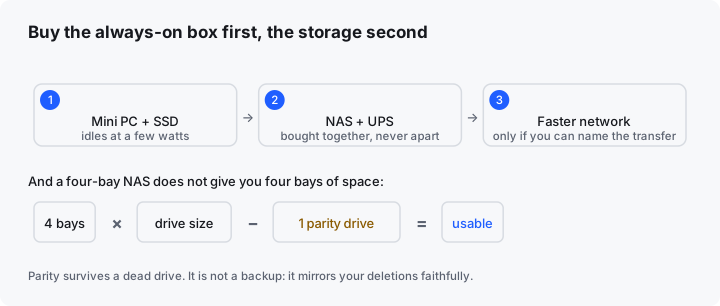
A four-bay NAS advertised as “up to 64TB” does not give you 64TB. In any single-parity layout, one drive’s worth of capacity is spent on redundancy and is not available to you. Four 4TB drives is 12TB usable, not 16TB.
That redundancy buys you exactly one thing: surviving a drive failure without downtime. It is not a backup. It does not protect you from deleting the wrong folder, from ransomware, or from the house burning down, because every one of those events is faithfully mirrored across every drive in the array. A backup lives somewhere else, and a second copy in the same box is a copy, not a backup.
The UPS is not optional the moment data lives on it
This is the one item on the list people cut and then regret. A filesystem being written to when power drops can lose more than the file in flight, and a NAS is by definition a machine that is writing when you are not watching.
A small battery backup does not need to run the array for an hour. It needs to hold long enough for a clean shutdown, which is minutes, and most units will signal the machine over USB to do exactly that automatically. Buy it with the storage, not after the first outage.
The network is last, and usually never
Managed switches and 2.5-gigabit links are near the top of most homelab guides and near the bottom of the real priority list. Ordinary gigabit saturates at roughly 110MB/s, which is faster than a single spinning drive and faster than anything streaming needs. You feel the upgrade when you routinely move very large files between two machines, and almost never otherwise.
If you want to spend on the network, spend on where the box sits: a wired run to an always-on machine solves more real problems than any switch upgrade.
A cheaper first step than any of this
Everything above assumes you already know you want this. Install one service on the computer you own right now, today, and use it for two weeks. If you stop opening it, you have learned something worth far more than the mini PC, and it cost you an afternoon.
A Raspberry Pi is the other honest entry point, and it is the better one if the project is a specific small always-on job, an ad-blocking resolver or a home automation hub, rather than a general-purpose server.
The order, one line
Mini PC and one SSD, then a second copy of anything irreplaceable, then a NAS and its UPS together, then the network only if you can name the transfer that is annoying you.
Best overall: the mini PC (N100, 16GB RAM)
The mini PC is the honest first purchase for almost everyone: it idles at a quarter of a NAS’s draw, costs less, and is the one that decides whether the hobby sticks. Buy it with a single SSD, and stop there until storage is actually the constraint you feel.
Who it is for: people who are actually going to run something — the mini PC is right for beginners who want a cheap, always-on box and no fan noise, and it is the one to buy before you talk yourself into a NAS you don’t need yet.
Mini PC (N100, 16GB RAM)
Idles at roughly a quarter of a NAS's power draw, silent, and cheaper than the NAS you were about to buy
Start here. Buy it with a single SSD and stop there until storage is the constraint you actually feel — most people never need the NAS they talked themselves into.
Check the current price on Amazon ›Common questions
Mini PC or NAS for a first self-hosted box?
An N100-class mini PC and one NVMe SSD. Buy the NAS when you have a specific storage problem the mini PC has failed at, which is later than most people expect.
How much does it cost to run?
Idle power is the constraint, not peak performance, because the box idles nearly all the time. A low idle figure is worth more over a year than any benchmark on the listing.
Do I need a UPS?
The moment data you care about lives on it, yes. Filesystem damage from a power cut costs more time than the UPS costs money.
Where to look on Amazon
These are searches, not picks. We do not quote prices or specifications here: Amazon’s terms allow those only where Amazon itself serves the data, and a hard-coded number is wrong the week after it is written. Compare listings against the order above, and check idle power draw before peak.
- mini pc n100 16gb ram , the first purchase for almost everyone, and the one that decides whether the whole hobby sticks
- nvme ssd 2tb internal , more than a first year of self-hosting needs, and check the mini PC’s slot type before ordering
- raspberry pi 5 8gb starter kit , the better entry point when the job is one specific always-on service rather than a general server
- 4 bay nas enclosure diskless , the second purchase, once something irreplaceable lives on the machine, and remember one bay goes to parity
- ups battery backup for nas , bought at the same time as the storage, sized for a clean shutdown rather than for uptime
- 2.5gbe managed switch 8 port , genuinely last, and only when you can name the file transfer that is annoying you
Written from published power and capacity specifications and standard single-parity arithmetic. We do not claim hands-on testing of specific models we have not used.