Best physical focus timer for deep work: the desk timers that keep you off the phone
We may earn a commission if you buy through these links — at no cost to you.
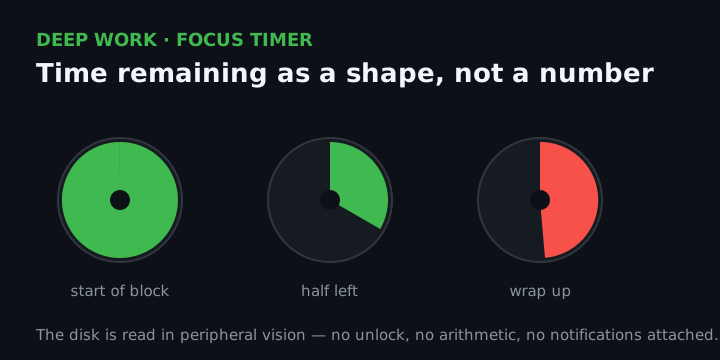
Short answer: buy a silent, single-purpose visual countdown timer — the Time Timer MOD — and keep it on the desk where your phone is not. The reason is not that a physical timer measures minutes better than an app; it is that using the app requires unlocking the device that is the distraction. A visual disk then removes the second, quieter cost: reading “how much is left” off digits takes a small deliberate act, while a shrinking disk answers it in peripheral vision, without you doing anything. If you want the pomodoro cycle itself to run without you resetting anything, the Ticktime cube is the one that actually does that. This guide is for people who already know how to work in blocks and keep losing the blocks to the phone.
How we picked these
The phone is a fine timer and a terrible place to keep one
Every timer app on the market can count 25 minutes. That was never the hard part. The hard part is that using the app means unlocking the phone, and the unlock is where the session dies — a notification stack, a quick check of one thing, and you are back twenty minutes later with the block gone. The block did not fail because you lost track of time. It failed because checking the time cost you a screen.
A single-purpose timer removes exactly that step. There is nothing on it to check except the time, so the glance stays a glance. That is the whole case for the category, and it is why a cheap mechanical timer beats a free app for this one specific job.
What actually decides the buy (the five-line checklist)
- Silent, or ticking. A mechanical sweep is silent; a cheap quartz movement ticks. If you work in a quiet room, in a shared space, or record audio, the tick is the thing that makes you stop using it. Check for “silent operation” or “no loud ticking” as a stated feature, not an inference from the photo.
- Visual disk, or digits. A shrinking coloured disk answers “how much is left” in peripheral vision. Digits answer “exactly how many minutes and seconds” — better for a hard deadline, worse for staying absorbed. Pick the display for the job: blocks want the disk, appointments want the digits.
- Presets, or a custom length. Real deep work rarely fits a fixed 25. A timer with a custom countdown (typically anything from one minute up to 60–99 minutes) lets you size the block to the task instead of the reverse.
- Does it run the cycle itself. A pomodoro cycle is 25 minutes of work, a 5-minute break, repeated, with a longer break every fourth round. Most devices sold as “pomodoro timers” only count down once and leave the alternation to you. Only a few run the 25/5 alternation automatically — that is the single most useful thing to verify on the listing.
- How it is powered. Mechanical wind-up means no batteries ever and a soft tick; AA means replace once a year; USB-C rechargeable means it can die on you at the worst moment if you forget. None is wrong — just know which failure you are choosing.
The verdict blocks: read these honestly before any listing
Best overall: the Time Timer MOD
For almost everyone, the pick is the Time Timer MOD — the 60-minute visual timer with a shrinking coloured disk and a genuinely silent movement. It is the device that does the one thing a phone timer cannot: it shows the block as a disappearing shape you can read without engaging with the number, and it is silent, so it does not become the reason you stop using it.
Who it is for: the person who works in blocks and keeps losing them to the phone. You set it visually by turning the disk, the red (or rainbow) area disappears as the time passes, and a low alert ends the block. No app, no account, no screen, no notifications attached to it.
Who it is not for: anyone who wants the 25/5 cycle to advance on its own — the MOD counts down once and stops, so you reset it for the break yourself. And anyone who needs an exact numeric readout to the second should take a digital timer instead.
Time Timer MOD
60-minute visual countdown with a shrinking colour disk and silent operation
Sold and shipped by Amazon. The category's reference product: silent, single-purpose, and readable at a glance without a phone.
Check the current price on Amazon ›Best for running the pomodoro cycle itself: the Ticktime Pomodoro Cube
If the thing you want is for the technique to run without you, the Ticktime Pomodoro Cube is the honest pick: its listing advertises automatic 25-minute focus and 5-minute break cycles that repeat, which almost nothing else in this category does. It is small, magnetic, rechargeable over USB-C, and offers silent, vibration, and sound alerts, so it works in a quiet room without ticking.
Who it is for: the boxed-in-25-minutes worker who wants the alternation handled and will not reset a disk four times an hour.
Who it is not for: anyone who works in longer blocks — a device that insists on 25-minute turns is a worse fit for 60–90 minute deep work than a plain visual timer, and you would be paying for a cycle you override.
Best budget flip-to-start: the OORAII Rotating Productivity Timer
For the lowest-friction option, the OORAII Rotating Productivity Timer is a gravity-sensing cube: flip it onto a preset face (5, 25, 10, or 50 minutes) and it starts; flip it screen-up to pause. There is no setting, no menu, and no phone. The vibration alert is the point in a shared room — it tells you without telling everyone else.
Who it is for: the first timer buy, and anyone who wants the physical act of starting a block to be the ritual.
Who it is not for: anyone who needs to set an off-preset length often — the flip faces are fixed, and the custom mode is fiddlier than the disk it competes with.
Best mechanical, zero-battery: the Secura 60-Minute Visual Countdown Timer
If you want the one that cannot run out of charge and cannot be updated into something else, the Secura 60-Minute Visual Countdown Timer is a large, fully mechanical visual timer with a magnetic back — twist the dial, watch the disk close, no batteries ever. Be honest with yourself about the trade: it ticks.
Who it is for: the magnetic-backboard setup, the classroom-sized face read from across a room, and anyone who wants a timer with no electronics in it at all.
Who it is not for: quiet-room workers — the mechanical tick is real, and if it would annoy you by week two, take a silent model instead.
The comparison at a glance
| Time Timer MOD (best overall) | Ticktime Cube | OORAII Rotating Timer | Secura Mechanical | |
|---|---|---|---|---|
| Display | Shrinking colour disk | LED digits | LED digits | Shrinking colour disk |
| Silent | Yes | Yes (silent mode) | Yes (vibration) | No — ticks |
| Runs 25/5 cycle | No | Yes (automatic) | No | No |
| Custom length | Up to 60 min | Yes | Limited | Up to 60 min |
| Power | AA battery | USB-C rechargeable | USB-C rechargeable | Mechanical, none |
| Typical band | High-teens / around twenty | Around twenty | Mid-teens | Twenties |
Prices are bands and they move. We do not quote exact figures here — Amazon’s terms allow prices only where Amazon itself serves the data, and a hard-coded number is wrong the week after it is written.
What first-time buyers miss
- “Timer” on the listing does not mean silent. A ticking timer gets abandoned in a quiet room, and a quiet room is where deep work happens. Confirm the word silent — or that the sound is a switchable alert you can turn off.
- Most “pomodoro” timers do not run pomodoro. They count down once. The technique is the cycle; if you want it automated, that is a specific feature to look for, not something to assume from the name.
- A 25-minute device can be a downgrade for deep work. If your real sessions run 60–90 minutes, a fixed 25-minute timer interrupts your best stretch and buys you a break you did not want. Match the device to your actual block length, or buy one that takes a custom time.
- Rechargeable means it can be empty. USB-C timers are convenient right up to the morning you need one and it is flat. Charge it the day it arrives, not the day you plan to use it.
- A timer is one lever, not the system. It stops the time-check unlock. It does not stop the phone lying on the desk. Put the phone in another room — the timer does the rest of the job. (For the attention side of this, see the habits versus attention guide .)
The order, in one line
Buy a silent visual timer for blocks (the Time Timer MOD), switch to the Ticktime cube if you want the 25/5 cycle to run itself, drop to the OORAII if the flip-to-start ritual matters more than flexibility, and take the mechanical Secura only if you want no battery in the device and can live with a tick.
Common questions
Is a physical timer actually better than a phone timer?
It is not a better timer; it is a better place to keep a timer. The measurement is identical. What changes is that checking a physical timer costs a glance, while checking a phone timer costs an unlock — and the unlock is where focus sessions are lost. If your phone never derails you, an app is fine.
Do I need a “pomodoro” timer, or just any timer?
Only if you want the cycle automated. The pomodoro technique is 25 minutes of work, a 5-minute break, repeated, with a longer break every fourth round; a plain countdown timer does the 25 and leaves the alternation to you, which is perfectly workable. Buy the automatic cycle only if resetting the timer yourself is what makes you quit.
What is the single most important spec?
Silence. A timer you stop using because it ticks is worth nothing, and quiet rooms are exactly where block work happens. After that: a visual disk for blocks, digits for deadlines.
Where to look on Amazon
These are picks, not searches. We do not quote exact prices — Amazon’s terms allow prices only where Amazon itself serves the data, and a hard-coded number is wrong the week after it is written. All five links are direct product pages.
- Time Timer MOD Home Edition Rainbow Wheel (B0FBFVP1NP) — the best overall: silent 60-minute visual countdown with a shrinking colour disk, the one to start with.
- Ticktime Pomodoro Timer Cube (B0FSL1YNX9) — the best for running the 25/5 cycle automatically: magnetic, USB-C rechargeable, silent/vibration/sound alerts.
- OORAII Rotating Productivity Timer (B0D7JG4VLD) — the best budget flip-to-start: gravity-sensing cube with 5/25/10/50-minute faces and a vibration alert.
- Secura 60-Minute Visual Countdown Timer (B07WFDZ72L) — the best mechanical, no-battery option: oversized face, magnetic back, fully wind-up.
- Ticktime T6 Pomodoro Timer Cube (B08HWCWY6Z) — the widest preset set (3/5/10/15/25/30 min) plus custom countdown and stopwatch; buy it over the cheaper cube only if that granularity is what you want.
Written from published product specifications and the standard definition of the pomodoro technique. We do not claim hands-on testing of the specific units listed, and we do not make medical or clinical claims about focus or ADHD — the “ADHD” wording that appears on some listings is the seller’s copy, not ours. Consult a clinician for clinical concerns.