Best 2.5GbE switch for a small home lab: which multi-gig switch earns its place
We may earn a commission if you buy through these links — at no cost to you.
Short answer: buy the TP-Link TL-SG108-M2 — an 8-port, fanless, unmanaged 2.5GbE switch — and stop there. The reason is not that 2.5G is fast in the abstract; it is that the moment one device on your network (a NAS, a mini PC, a newer desktop board) has a 2.5G port, that port is worth nothing while it is plugged into a 1GbE switch. The single cheapest fix that unlocks the whole link is an unmanaged multi-gig switch, and for a small lab the 8-port fanless TP-Link is the one that covers the NAS, the always-on box, the workstation, the access point and the spares without a single configuration screen. Buy a managed or 10G-uplink unit only when you can name the feature you are buying it for.
How we picked these
The port is worth nothing while the switch is slower than the port
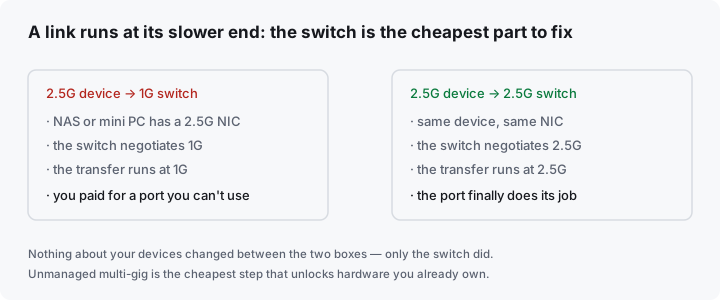
Multi-gig shopping almost always starts in the wrong place. People ask “is 2.5G worth it” as though it were a subscription you sign up for. It is not. It is a negotiation between exactly two devices at a time: a link runs at the speed of the slower end. If your NAS negotiates 2.5G and your switch only does 1G, the transfer runs at 1G — you paid for a 2.5G port and got a 1G link.
That inverts the usual advice. You do not buy a multi-gig switch to “go faster” in general; you buy it so that the 2.5G hardware you already own stops being throttled by the cheapest part in the chain — the switch. And that happens in a very ordinary way: a Synology or QNAP NAS, an N100-class mini PC, or a recent motherboard ships with a 2.5G NIC by default now, while the switch on the shelf is still a ten-year-old 1G unit.
What actually decides the buy (the five-line checklist)
- Port count vs. what you will plug in. A home lab fills ports fast: NAS, always-on box, workstation, access point, printer, a spare for the laptop dock. Five ports is a bedroom; eight is a small lab; anything past eight and you should be looking at whether you actually want a rack. Overbuy one port, not four.
- Unmanaged or managed. Unmanaged is plug-and-play: no IP, no web UI, no firmware, nothing to misconfigure. Managed buys you VLANs, link aggregation (bonding two ports between the NAS and the switch), and port mirroring — genuinely useful, but only if you can name the thing you need it for today. Most small labs do not need it, and a half-understood managed switch is a worse switch than a good unmanaged one.
- 2.5G only, or 2.5G plus 10G uplinks. A handful of units add 10G SFP+ ports. They are the cheapest way to give the NAS a fast uplink and let the rest of the lab run at 2.5G. If you have no 10G device yet, this is a “later” feature, not a “now” feature.
- Fanless, or not. A switch in a bedroom, office or living-room shelf has to be silent. Most small multi-gig switches are fanless by design; confirm the word on the listing rather than assuming it from the photo.
- Heat and power. 2.5G and 10G run hotter than 1G. Metal, passively-cooled chassis dissipate that heat; a plastic case full of heat is the thing that shortens the life of a switch that never turns off. A small external adapter is normal — a loud internal fan is not.
The verdicts: read these honestly before any listing
Best overall: the TP-Link TL-SG108-M2
For almost every small home lab, the pick is the TP-Link TL-SG108-M2 — an 8-port, unmanaged, fanless 2.5GbE switch in a metal case. It is the boring answer, and boring is the point: it has no web interface to leave in a half-configured state, no firmware to babysit, and it turns a lab of 1G links into a lab of 2.5G links for the price of a couple of cables. Eight ports covers the NAS, the always-on box, the workstation, the access point and the dock, with room left over.
Who it is for: the small lab that already has one or two 2.5G devices and just wants the network out of the way. Plug in, done.
Who it is not for: anyone who needs VLANs, link aggregation or port mirroring today — that is a managed switch, and the TL-SG108-M2 will not do it. And anyone whose next step is a 10G backbone should look at a unit with SFP+ uplinks instead of buying this one twice.
TP-Link TL-SG108-M2
8-port 2.5GbE unmanaged switch, fanless, metal enclosure, plug-and-play
Rated 4.6/5 from roughly 900 Amazon ratings at the time of writing. The reference small-lab multi-gig switch: silent, no configuration, and enough ports to stop counting.
Check the current price on Amazon ›Best small and cheapest: the TP-Link TL-SG105S-M2
If the lab is really two or three devices — a NAS and one always-on box — the five-port TP-Link TL-SG105S-M2 does the same job for less and takes less shelf space. Same silent, unmanaged, 2.5G-every-port philosophy, just fewer ports. Buy it when you can honestly count your wired devices on one hand and expect that to stay true.
Who it is for: the two-device lab, the desk switch, and anyone who wants the smallest possible bill to un-throttle a single 2.5G link.
Who it is not for: anyone who has ever thought “I’ll add a patch panel” — you will fill five ports and be back buying the eight-port model within a month.
Best when you want VLANs and a 10G uplink without a big spend: the SODOLA 6-port 2.5G web-managed switch
The SODOLA 6-port 2.5G switch is the value outlier of the category: four 2.5G RJ-45 ports, two 10G SFP+ ports, and a light web interface that adds VLANs, link aggregation, QoS and IGMP snooping — for less than the unmanaged 8-port above. The 10G SFP+ pair is the interesting part: it is the cheapest way to give a NAS a genuinely fast uplink while the rest of the lab runs at 2.5G.
Who it is for: the tinkerer who wants segmentation (an IoT VLAN), or a 10G uplink to a NAS, without paying 10G-switch money.
Who it is not for: someone who wants zero configuration. It is managed — the interface is basic, and a feature you do not configure correctly is a feature that will confuse you later. Buy it for a named need, not for the spec sheet.
Best 10G copper uplink: the QNAP QSW-2104-2T-R2
The QNAP QSW-2104-2T-R2 pairs four 2.5G ports with two 10Gbase-T copper ports. It matters for one specific reason: the 10G ports are RJ-45, not SFP+, so you can run 10G over Cat6a to a device whose 10G port is also copper — no transceivers, no DAC cables, no SFP+ shopping. This is the unit for the NAS that already has a 10G copper NIC and a user who does not want to think about optics.
Who it is for: the small lab with real 10G appetite at the NAS end but copper-only everywhere else.
Who it is not for: anyone who already owns SFP+ gear (go with a SFP+ unit), or anyone on a tight budget — this is the most expensive sensible small-lab pick here.
Best for the enthusiast who wants routing and a real OS: the MikroTik CRS310-8G+2S+IN
The MikroTik CRS310-8G+2S+IN is the pick for the person who enjoys the switch: eight 2.5G ports, two 10G SFP+ ports, and MikroTik’s RouterOS under the hood, so it can do switching, VLANs, and a degree of L3 routing that no other unit on this page touches. It is the most configurable and the most expensive, and it rewards exactly the reader who already knows why they want it.
Who it is for: the homelabber who wants VLANs, an L3 core-ish role, and SFP+ uplinks in one box, and is comfortable in RouterOS.
Who it is not for: the beginner. RouterOS is powerful and unforgiving; if a web wizard is what you want, this is the wrong page section.
The comparison at a glance
| TL-SG108-M2 (best overall) | TL-SG105S-M2 | SODOLA 6-port | QNAP QSW-2104-2T-R2 | MikroTik CRS310 | |
|---|---|---|---|---|---|
| 2.5G ports | 8 | 5 | 4 | 4 | 8 |
| 10G uplinks | None | None | 2× SFP+ | 2× copper 10Gbase-T | 2× SFP+ |
| Managed | No | No | Web-managed (light) | No | RouterOS (full) |
| Fanless | Yes | Yes | Yes | Yes | Yes |
| Best for | the default pick | two-device labs | VLANs + 10G on a budget | 10G without optics | the enthusiast |
| Typical band | Around sixty | Under forty | Around fifty | Around a hundred and twenty | Over two hundred |
Prices are bands and they move. We do not quote exact figures here — Amazon’s terms allow prices only where Amazon itself serves the data, and a hard-coded number is wrong the week after it is written.
What first-time buyers miss
- “2.5G” on the switch does not upgrade your devices. The link runs at the speed of the slower end. If your NAS only has a 1G port, a 2.5G switch changes nothing for it. Check the device ports first, then buy the switch to un-throttle them.
- Unmanaged is a feature, not a compromise. For a small lab, the absence of a web interface is the absence of a way to break the network at 11pm. Buy managed only for a named need.
- The 10G uplink is the real upgrade path. If you think you may ever add a 10G NAS, paying a little more now for two SFP+ (or 10Gbase-T) ports saves buying a second switch later. Decide this honestly at purchase time.
- Cables and transceivers are part of the bill. 2.5G runs happily on good Cat5e/Cat6, but 10G over copper wants Cat6a, and 10G over SFP+ wants a DAC cable or a transceiver. Budget for them; a switch with no cable is a brick.
- A switch is one lever, not the lab. Fixing the switch un-throttles the wired links. It does not make your internet faster, and it does nothing for Wi-Fi. (For the box at the other end of the cable, see the first self-hosted server guide .)
The order, in one line
Buy the TP-Link TL-SG108-M2 as the default; drop to the TL-SG105S-M2 if you truly have two devices; take the SODOLA 6-port if you want VLANs and a 10G uplink cheaply; the QNAP QSW-2104-2T-R2 if your 10G is copper; and the MikroTik CRS310 only if you want to run the switch, not just use it.
Common questions
Is 2.5G worth it over 1G?
For a home lab with a NAS or a local backup target, yes — it is the cheapest step that measurably changes large file copies and VM/backup windows, and the hardware is now standard on new NAS units, mini PCs and motherboards. For a household that only streams and browses, no: 1G is already far past the internet link, and 2.5G will change nothing you can feel.
Do I need a managed switch?
Only if you can name the feature you need today — a VLAN to isolate IoT devices, link aggregation to bond two NAS ports, or port mirroring to debug. If you cannot name it, an unmanaged switch is the better buy: fewer things to misconfigure, identical throughput.
Can I mix 1G and 2.5G devices on the same switch?
Yes. Multi-gig switches negotiate per port, so a 1G device runs at 1G and a 2.5G device at 2.5G on the same unit. That is the entire point of buying one: the fast ports are fast and the slow devices are unaffected.
Where to look on Amazon
These are picks, not searches. We do not quote exact prices — Amazon’s terms allow prices only where Amazon itself serves the data, and a hard-coded number is wrong the week after it is written. All links are direct product pages.
- TP-Link TL-SG108-M2 8-Port 2.5G Unmanaged Switch (B08ZHZL5Q7) — the best overall: 8 fanless 2.5G ports, metal case, no configuration, the default small-lab pick.
- TP-Link TL-SG105S-M2 5-Port 2.5G Unmanaged Switch (B0CMXXPTVH) — the best small and cheapest: same silent 2.5G-per-port idea in five ports for two- and three-device labs.
- SODOLA 6-Port 2.5G Web-Managed Switch, 4×2.5G + 2×10G SFP+ (B0DTP922TT) — the best value managed pick: VLANs, LACP and two 10G SFP+ uplinks for less than the unmanaged 8-port.
- QNAP QSW-2104-2T-R2 4×2.5G + 2×10Gbase-T Copper Switch (B0DWW3CBB9) — the best 10G-copper uplink: run 10G to a copper NIC with no transceivers or DAC cables.
- MikroTik CRS310-8G+2S+IN 8×2.5G + 2×10G SFP+ RouterOS Switch (B0CH9NHFHS) — the best for enthusiasts: full RouterOS switching and L3 on top of eight 2.5G and two SFP+ ports.
Written from published product specifications read from live Amazon listings on 2026-09-21. The rating and review counts stated are as reported on the listing at that time and will drift. We do not claim hands-on testing of the specific units listed. Port counts, uplink types and management features are as stated by the manufacturer; verify the exact revision before buying.